Podcast:
AI seems to be fascinated by my framework/ecosystem, and this makes me happy and proud 
Another podcast:
docker-scripts-blog.pdf (41.9 KB)
The Impossible Desktop: 5 Surprising Ways Docker-Scripts is Reimagining the Cloud
1. Introduction: Breaking the “GUI in a Container” Myth
For years, the industry consensus was rigid: containers are for headless microservices, and Virtual Machines are for desktops. The idea of running a heavy, graphical Linux environment inside a lightweight Docker container was dismissed as a technical novelty—a myth that didn’t scale.
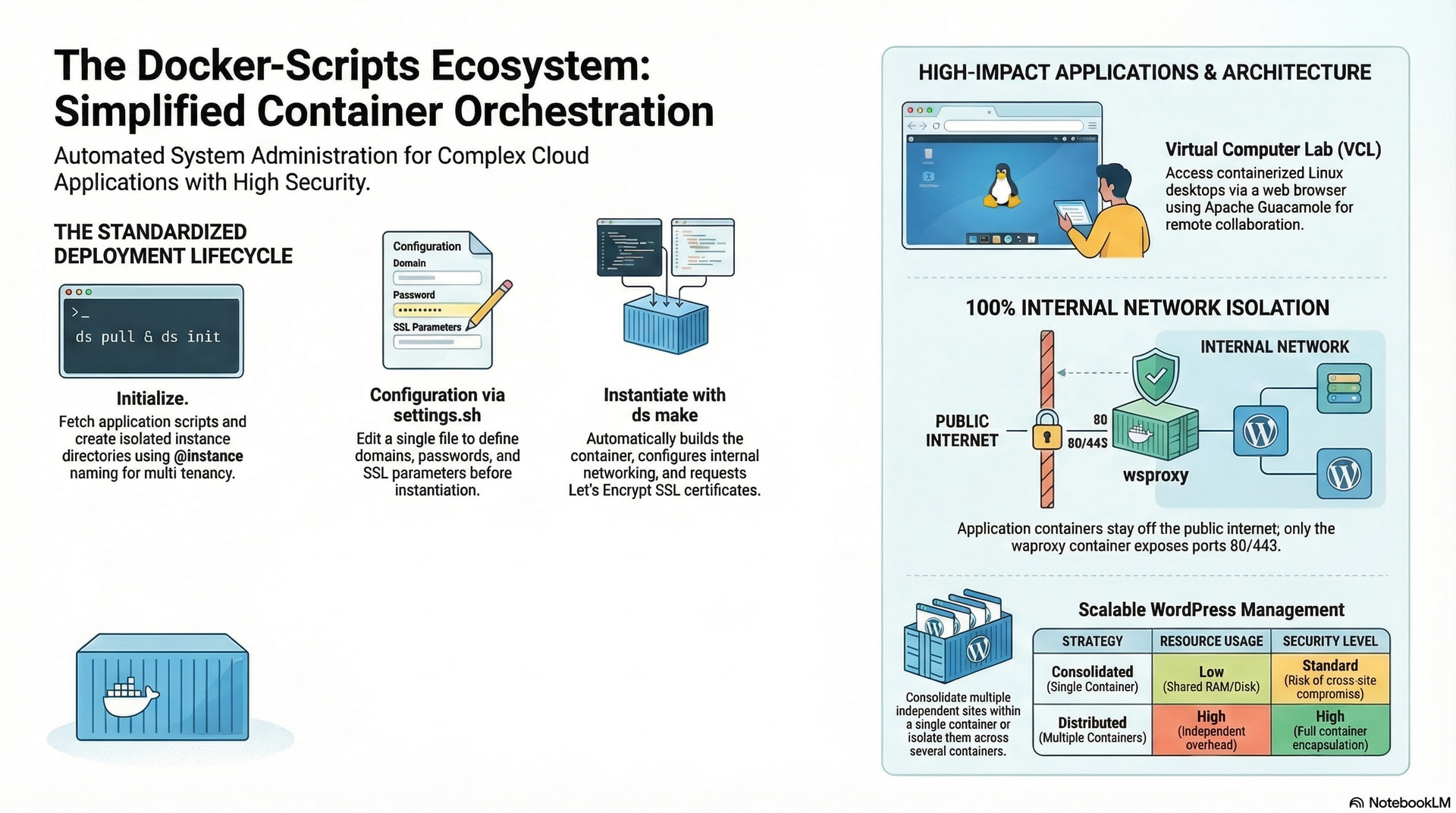
However, Dashamir Hoxha’s docker-scripts ecosystem is effectively shattering that limitation. This isn’t just a collection of shell scripts; it is a sophisticated meta-orchestrator providing a “poor man’s orchestration” layer. By leveraging a deterministic path—moving through a lifecycle of Acquisition, Initialization, Configuration, and Instantiation—it allows admins to deploy complex stacks with minimal friction. The real magic happens during the ds make phase, where the system utilizes m4 macro expansion to generate precise configuration files, ensuring that your environment is consistent, repeatable, and mathematically sound.
--------------------------------------------------------------------------------
2. Takeaway 1: Your Entire Desktop is Now a Browser Tab
One of the most striking achievements of this ecosystem is the ability to project a full Linux Mint 19 or Ubuntu 18.04 desktop directly into a standard web browser. This is achieved via Guacamole, a clientless remote desktop gateway that translates RDP/VNC protocols into a web-friendly stream.
As the source material notes:
“Installing a Linux desktop in a Docker container and accessing it from a browser seems like something that is impossible. However it works.”
The technical “magic” moment for any architect is the low-friction management panel. By simply pressing Ctrl+Alt+Shift, you open the Guacamole management panel to handle sessions and file transfers. Because the desktop runs entirely on the server, the client hardware is irrelevant. This democratizes access to specialized software for students or developers with decade-old, low-powered hardware—the server handles the heavy lifting while the user simply opens a tab.
Architect’s Note: Use ds pull desktop followed by ds init desktop @<domain> to begin the initialization of a containerized workstation.
--------------------------------------------------------------------------------
3. Takeaway 2: “Watch” vs. “Collaborate” – The Future of Remote Mentorship
Remote technical instruction often hits a wall when students become passive observers. Docker-scripts bypasses this by utilizing Guacamole’s distinct session-sharing modes to create a “Distributed Computer Lab.”
-
Watch-only Mode: The teacher demonstrates a workflow, such as debugging a C++ application, while students observe the live desktop in real-time via a shared link.
-
Collaborate Mode: This is pair programming at the infrastructure level. Both the mentor and the student gain control over the mouse and keyboard within the same containerized environment.
This transforms a static help session into an interactive laboratory. If a student is stuck on a persistent bug, the mentor doesn’t just “see” the screen; they jump into the container to troubleshoot alongside the student in the actual production-ready environment.
--------------------------------------------------------------------------------
4. Takeaway 3: The @ Symbol – Poor Man’s Multi-Tenancy
In a high-overhead environment like Kubernetes, managing multiple environments (staging vs. production) requires a mountain of YAML. Docker-scripts simplifies this via the @ symbol in its CLI.
Running ds init <app> @<instance> creates a structured directory in /var/ds/ (e.g., /var/ds/wordpress@site1). This directory-based isolation allows an admin to host numerous unique instances on a single host. When you run ds site init, the meta-orchestrator automatically creates VirtualHost configurations for both the wsproxy gateway and the application container. This provides enterprise-grade multi-tenancy without the “heavy” abstraction of a service mesh, keeping everything human-readable and easy to audit.
--------------------------------------------------------------------------------
5. Takeaway 4: Security by Isolation (The No-Port Strategy)
In a traditional setup, every container (WordPress, MariaDB, etc.) might expose ports to the host, creating a massive attack surface. Docker-scripts utilizes a “No-Port Strategy” where all traffic is funneled through a single gateway: the wsproxy container.
This architecture ensures SSL termination is handled centrally via Let’s Encrypt. Application and database containers live on an isolated internal network with zero exposed ports.
| Component | Traditional Setup | Docker-Scripts Setup |
|---|---|---|
| External Port Exposure | Multiple (80, 443, 3306, etc.) | Only wsproxy (80, 443) |
| Application (WordPress) | Exposed to Host Network | Internal Network Only |
| Database (MariaDB) | Often Exposed for Admin | Internal Network Only |
| SSL Management | Per-app configuration | Centralized via wsproxy |
By preventing external port scanning of the application and database layers, you’ve effectively hardened the system against the most common automated exploits.
--------------------------------------------------------------------------------
6. Takeaway 5: The “Invisible” Backup Strategy
For a Senior Architect, reliability is about “worst-case” planning. Docker-scripts employs a sophisticated backup methodology using bindfs and rsync.
To ensure the backup process never corrupts live data, the system creates a read-only mount of the data in /var/ds/. This “invisible” layer of safety ensures the backup utility can read the state but can never modify it. Furthermore, the ecosystem uses restricted SSH authorized_keys (implementing no-pty and no-port-forwarding) for the backup user. Even if your backup server is compromised, the attacker cannot gain shell access or tunnel into your primary infrastructure.
Pro-Tip: Need to refresh an environment? Use ds remake to rebuild a container from scratch while keeping your persistent data intact.
--------------------------------------------------------------------------------
7. Conclusion: Beyond the Physical Lab
The “Distributed Computer Labs” created by Dashamir Hoxha proved their resilience during the pandemic. By combining WireGuard VPNs for secure tunneling and Epoptes for real-time monitoring, these labs allowed students at home to access high-end Linux workstations as if they were sitting in a physical classroom.
This points toward a compelling future for cloud architecture: the shift toward stateless desktops paired with stateful user data. In this ecosystem, the container (the environment) is disposable and easily remade via scripts, while the user data in /var/ds/ is permanent and protected.
Final Thought: If we can project a complete, collaborative workstation into a browser tab with a few shell scripts and m4 macros, are we entering an era where the hardware in our hands is merely a window, and our true “state” lives entirely in the logic of the scripts we write?
There is some dreaming (hallucination) on the materials above, but 90% is correct (and I do not have time to fix the rest).
Hi dashamir !
six months later… i am back here after big changes happened.. and will continue to happen:
bad things ( Jakob Coxon e.a. )
but there are good things ongoing, where docker plays it’s part ( Vorschlag: Remote Desktop Support - #18 by toni-member )
so i came back here 
toni
( during this years sfscon i will not be there in presence - recovering after an intervention in my right leg )